Partitioning PostgreSQL with TimescaleDB
If you're familiar with partitioning a Zabbix database using MySQL or any of the other forks like MariaDB, you're likely aware of the complexity involved, which often requires Perl scripts and manual database operations. Fortunately, PostgreSQL offers a much simpler and more streamlined approach. With the TimescaleDB extension, partitioning is fully automated. This extension is not only powerful and efficient, it is also the only method officially supported by Zabbix for database partitioning. TimescaleDB takes care of the underlying logic, freeing you from custom scripts and manual tweaks. For this reason, PostgreSQL could be the preferred and most convenient option for managing large scale Zabbix environments.
Installing TimescaleDB
First, make sure to download TimescaleDB from the correct source: https://docs.timescale.com/self-hosted/latest/install/. Avoid using the version available in the standard PostgreSQL package repository, as it is outdated and not suitable for Zabbix.
TimescaleDB comes in two editions: one released under the Apache license and the other as the Community edition. For Zabbix, the Community edition is the recommended choice. It includes all advanced features such as native compression, which are essential for efficient long term data storage and performance in larger environments.
Info
When using TimescaleDB with Zabbix on Red Hat or its derivatives, make sure PostgreSQL is installed from the official PostgreSQL community repositories, as described in our setup guide. Do not use the PostgreSQL version provided by Red Hat or its derivatives. The TimescaleDB extension is not compatible with that version, and attempting to use it will lead to failure in the configuration.
For SUSE Linux it is another story. TimescaleDB does not provide packages for SUSE Linux. On SLES 15, the TimescaleDB extension is included in the official SUSE PackageHub repositories and on openSUSE Tumbleweed it is available as well. But for that to work you DO need to install PostgreSQL from the OS vendor-provided packages instead of the official PostgreSQL repositories.
Unfortunately, TimescaleDB seems not to be the available for openSUSE Leap and SLES 16. For those systems, you can add the SUSE Factory server:database:postgresql repository to your system and install TimescaleDB from there. However, the chances are high that this version will require also the Postgresql packages from that same SUSE Factory repository. Overall this should not be a problem on openSUSE, but on SLES, if you have paid support for PostgreSQL via SUSE, this will break your support contract. In that case your only option is to compile TimescaleDB from source against the SUSE supported PostgreSQL package.
Warning: Due to licensing restrictions, TimescaleDB packages provided by SUSE uses the Apache license instead of the Community edition. This means that some features like native compression are not available. If you require these features, you will need to compile TimescaleDB from source. In that case it won't matter if you installed PostgreSQL from the official PostgreSQL repositories or from the OS vendor-provided packages, as you will be compiling TimescaleDB against the PostgreSQL version you have installed.
Note
Always check in the Zabbix documentation before you start what version of PostgreSQL is supported and what version of the TimescaleDB is supported that way you don't install any unsupported version that could run you into issues. https://docs.timescale.com/self-hosted/latest/install/installation-linux/#supported-platforms
Add the TimescaleDB repository
adding the repository
Red Hat
sudo tee /etc/yum.repos.d/timescale_timescaledb.repo <<EOL
[timescale_timescaledb]
name=timescale_timescaledb
baseurl=https://packagecloud.io/timescale/timescaledb/el/$(rpm -E %{rhel})/\$basearch
repo_gpgcheck=1
gpgcheck=0
enabled=1
gpgkey=https://packagecloud.io/timescale/timescaledb/gpgkey
sslverify=1
sslcacert=/etc/pki/tls/certs/ca-bundle.crt
metadata_expire=300
EOL
SLES 15 SP7
SLES 16 and openSUSE Leap 16.0
zypper addrepo --refresh https://download.opensuse.org/repositories/server:/database:/postgresql/16.0/server:database:postgresql.repo
Ubuntu
Update your local repository list
Red Hat
SUSE
Ubuntu
Install TimescaleDB from package
We will now install the TimescaleDB externsion using the package manager, either from the official TimescaleDB repository for Red Hat and Ubuntu, or from the SUSE PackageHub or SUSE Factory repository for SLES and openSUSE. If you prefer to compile TimescaleDB from source, for example if you want the Community edition on SUSE or if you are using a different Linux flavor not supported by TimescaleDB, you can follow the instructions in the next section.
Install TimescaleDB
Red Hat
SLES 15 SP7
SLES 16 and openSUSE Leap 16.0
Note: the--allow-vendor-change option is required because the TimescaleDB package
is provided by the SUSE Factory repository, which is considered a different
vendor than the official SUSE repositories. This option allows zypper to replace
the PostgreSQL package from the official SUSE repository with the one from the
SUSE Factory repository, which is necessary for TimescaleDB to work correctly.
Ubuntu
Note
Of course, you need to match the TimescaleDB version to the version of PostgreSQL you installed. For example, if you are using PostgreSQL 14, you must install the corresponding TimescaleDB packages for version 14. The installation would look like this:
Using mismatched versions can lead to compatibility issues, so always make sure the TimescaleDB packages align with your PostgreSQL version.Make sure to replace all version numbers in the commands in this chapter with the version of PostgreSQL you have installed.
Warning
Be sure to install the version of TimescaleDB that is supported by Zabbix also when you upgrade your OS verify that the new database version and timescaledb are supported by Zabbix. It's probably best to exclude them from automatic updates. Do note however that this will also prevent you from getting newer postgresql packages as each timescaledb package is built against a specific postgresql package. So you may see errors during system updates when a newer postgresql package is available but the installed locked timescaledb has a requirement for the older postgresql package.
Check for specific versions
Red Hat
SUSE
Ubuntu
installing a specific version and lock the version
Red Hat
SUSE
Warning: on SLES15 using PackageHub you have all versions starting from the version that was originally shipped with SLES15 up to the most recent version. When using the SUSE Factory server:database:postgresql repository on SLES16 and openSUSE Leap you will always only have the latest built version available. On those systems, you can still lock the current version preventing it from being updated. But if you ever remove or upgrade the package, you won't be able to go back.Ubuntu
Compile TimescaleDB from source
If you already installed TimescaleDB from packages, you can skip this section. If you prefer to compile TimescaleDB from source, make sure to first uninstall any existing TimescaleDB packages.
First, we need to install the required dependencies for building TimescaleDB:
Install build dependencies
Red Hat
SUSE
Ubuntu
Next we will download the TimescaleDB source code from the official GitHub repository and check out a version that is supported by Zabbix:
Download TimescaleDB source code
Now it is time to actually build and install TimescaleDB:
Configure TimescaleDB
The next step is to load the TimescaleDB extension into your PostgreSQL database and tune the configuration. There are two ways to do this: the automated way and the manual way.
TimescaleDB provides a tuning script that analyses your system and applies recommended settings to optimize performance. On Red Hat based systems, you can run:
When installed on SUSE using the SUSE packages, the script is not available and
you will need to install it manually using Go. Additionally, the pg_config binary
is part of the postgresql17-server-devel package, which is not installed by default.
So we will install both packages, use Go to install the tuning script, and then
run it to tune your PostgreSQL configuration.:
Info
For Ubuntu and Debian based systems, simply run:
This script will suggest configuration changes and can update your postgresql configuration file automatically. If you prefer to tune the settings manually, which is often recommended for experienced users, you will need to edit your postgresql configuration file yourself.
At a minimum, make sure to add the following line at the end of the file:
Your PostgreSQL configuration file is typically located at /var/lib/pgsql/17/data/postgresql.conf
on Red Hat based systems, /var/lib/pgsql/data/postgresql.conf on SUSE, and
/etc/postgresql/17/main/postgresql.conf on Ubuntu.
After making these changes to your PostgreSQL configuration, either manually or using the tuning script, you must restart the PostgreSQL service to load the TimescaleDB extension and apply the new settings.:
Restart PostgreSQL service
Red Hat
SUSE
Ubuntu
Enable TimescaleDB extension in Zabbix database
Next, we connect to the Zabbix database as the user zabbixsrv, or whichever database
user you have configured earlier, and create the TimescaleDB extension. However,
before doing this, it is strongly recommended to stop the Zabbix server. This will
prevent the application from interfering with the database during the process, which
could otherwise cause locks or unexpected behavior.
Create timescaledb extension
Make sure the extension is installed by running \dx.
zabbix=> \dx
                                            List of installed extensions
Name     | Version |   Schema   |                                      Description
-------------+---------+------------+---------------------------------------------------------------------------------------
 plpgsql     | 1.0     | pg_catalog | PL/pgSQL procedural language
 timescaledb | 2.19.3  | public     | Enables scalable inserts and complex queries for time-series data (Community Edition)
(2 rows)

zabbix=>
Patch Zabbix database
To patch the Zabbix database for TimescaleDB, you will need to run the schema.sql script
provided by Zabbix in the zabbix-sql-scripts package. Make sure you have this
package installed on your system, refer to Chapter 0 - Getting Started: Preparing the system for Zabbix to configure the Zabbix repository.
With zabbix-sql-scripts installed, you can now apply the TimescaleDB
patch. This patch will migrate your existing history, trends, and audit log tables
to the TimescaleDB format. Depending on the amount of existing data, this process
may take some time.
Run the following command inside the database session:
Warning
When running the schema.sql script on TimescaleDB version 2.9.0 or higher,
you may see warning messages indicating that certain best practices are not
being followed. These warnings can be safely ignored. They do not affect the
outcome of the configuration process.
As long as everything is set up correctly, the script will complete without issue. You should see the following confirmation at the end:
psql:/usr/share/zabbix/sql scripts/postgresql/timescaledb/schema.sql:112:
NOTICE:  TimescaleDB is configured successfully
This confirms that the TimescaleDB extension and related Zabbix settings have been applied correctly.
The schema.sql script adjusts several important housekeeping parameters:
- Override item history period
- Override item trend period
To use partitioned housekeeping for history and trends, both of these options must be enabled. However, it is also possible to enable them individually, depending on your requirements.
In addition, the script sets two TimescaleDB specific parameters:
- Enable compression
- Compress records older than 7 days
These settings help reduce the size of historical data and improve long term performance. Let's start our zabbix server again before we continue
Let's have a look at them go in our menu to Administration -> Housekeeping
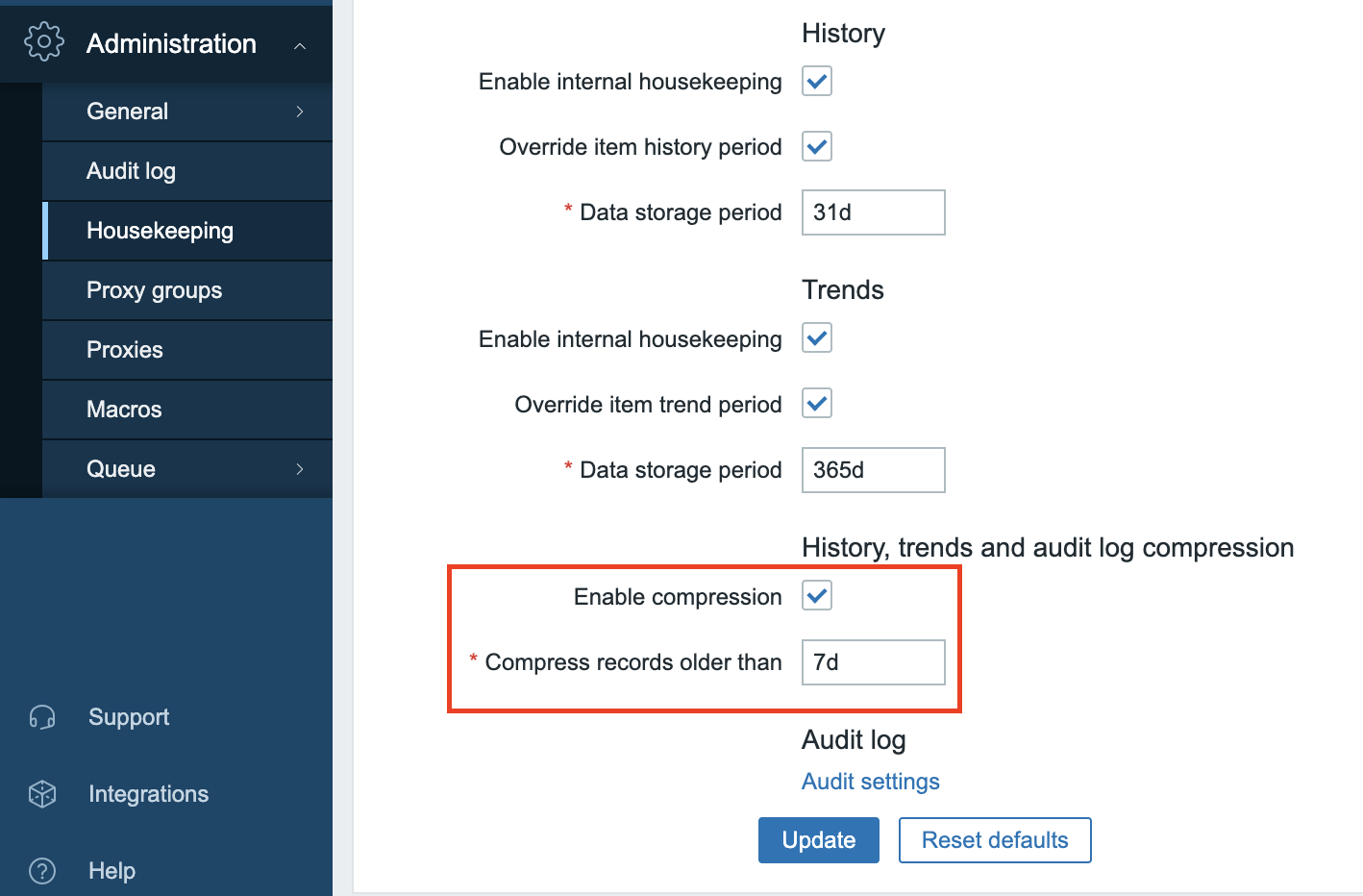
13.12 housekeeper settings
Conclusion
Using TimescaleDB with PostgreSQL is the only officially supported method for database partitioning in Zabbix. It replaces complex manual setups with automated, efficient handling of historical and trend data. Features like native compression and time based partitioning significantly reduce storage usage and improve query performance.
By installing PostgreSQL from the correct repository, tuning it properly, and applying the TimescaleDB schema patch, you ensure that Zabbix can scale reliably with minimal maintenance overhead. This setup not only optimizes performance but also prepares your environment for long term growth and data retention.
Questions
- What are the key advantages of using TimescaleDB compared to partitioning with MySQL or MariaDB?
- What might go wrong if you install PostgreSQL from the default Red Hat repositories when planning to use TimescaleDB?
- How does enabling compression in TimescaleDB benefit your Zabbix installation?