Dependent items
There are cases when you have large chunks of data which are rich of monitoring metrics. You can of course slice them with the help of scripts and so extract needed valuable pieces to be stored individually, as separate items. However, there is a native way in Zabbix which can do the very same thing without a need to involve any scripting. And that is something called "Dependent items".
Think of "Dependent items" as small fragments of your large dataset. Of course, nothing limits or tells you that your dataset must be large. It can also be small, but the smaller - the less sense the dependent items would make. When having something large to be collected, you have to collect that data only once and have the splitting being done by preprocessing.
Another use case when you might benefit from dependent items is when data collection has "high cost", in terms of time retrieving it or when network traffic matters. For example, some remote resource which you want to collect has slow network or you want to save each and every byte sent over the network, but there are multiple things in that resource which you want to monitor. Without dependent items approach you would need to retrieve that resource as many times as you have unique items, or store it once and then slice it on your own. But with dependent items, you need to collect such data only once and transform it into individual metrics just by employing native Zabbix features.
So basically, the beauty of dependent items lies in the data collection efficiency.
There are three main concepts involved when talking about "Dependent items":
- master item
- dependent item
- preprocessing
Master item is just a regular Zabbix item. It can be any type of data collection behind it - say it can be "Zabbix agent", "Zabbix trapper", "HTTP agent" item or anything else.
Once new value is collected for the master item, all of its dependent items are also updated. It has to be specified in dependent item's configuration, which item is the master item for it. One master item can have unlimited number of dependent items.
Info
Since dependent item gets updated on master item's value update, it does not have its own update interval
To be able to extract just the needed part of data from the master item, you will for sure want to apply some preprocessing. Preprocessing loves structured data. You should in all cases seek for structured data as your master item's content (e.g. json, csv, etc). This way, you will be able to extract needed data easier. When dealing with preprocessing, apply the most suitable method for particular data source format (e.g. use JSONPath for json) and understand your limits (e.g. regex is Perl flavor and JavaScript is Duktape underneath).
Hello World
Let's go through an example, the most basic one, so that you would better understand how the dependent items get updated.
First of all, we will have a simple bash script, which will create three lines of structured data.
#!/bin/bash

master_result=/tmp/master.txt

for x in {a..c}; do
  echo "${x}: $((RANDOM%100))" >>${master_result}.tmp
done

mv -f ${master_result}.tmp ${master_result}

exit 0
This script is added to cron and is being run once a minute. It is kind of obvious what this script does - it outputs random number and has a prefix of one of the three letters: "a", "b" or "c":
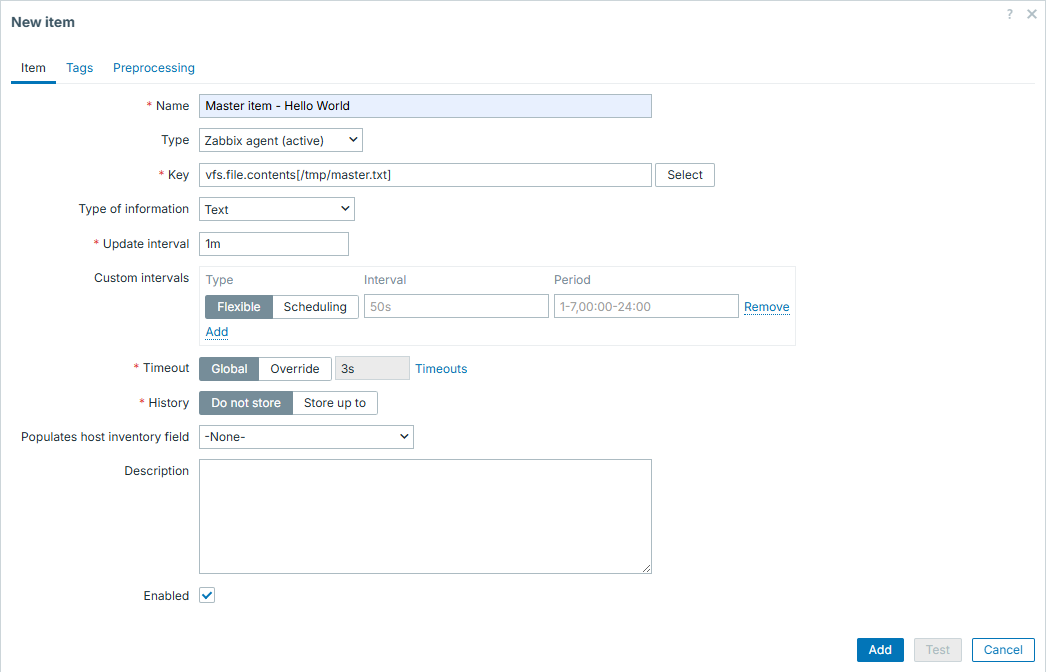
Now this data file becomes our "master item". It will be collected by Zabbix
native item vfs.file.contents, like:
Info
Master item on its own has a little purpose of being stored, especially when it is huge. Its only purpose could be debugging, thus once operating normally, it should not be stored and that will not affect dependent items in any way
And then we can set our dependent items:
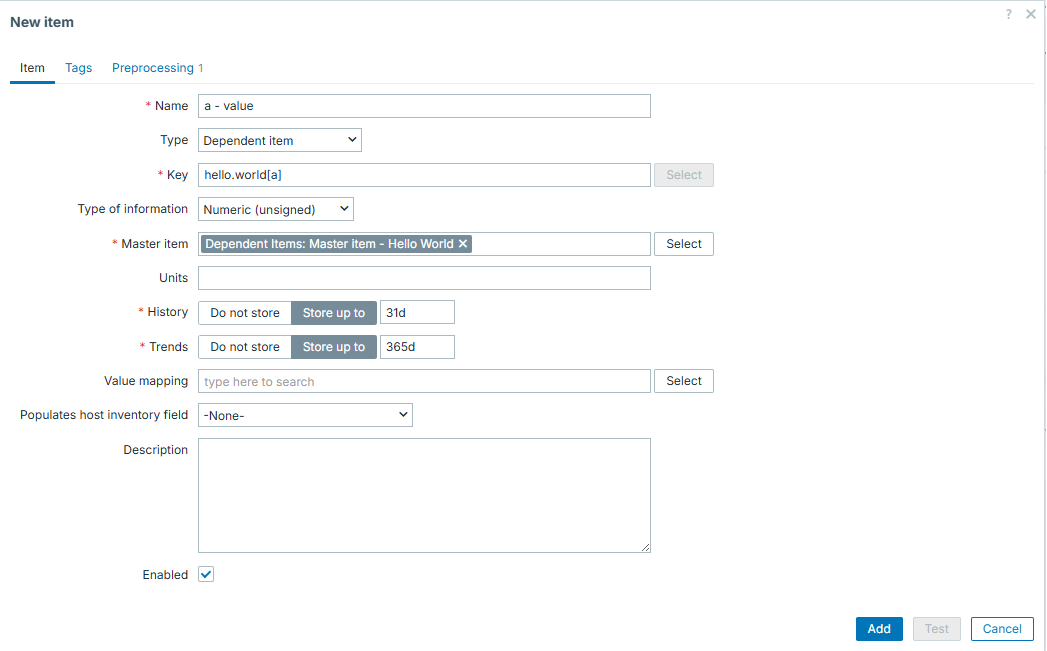
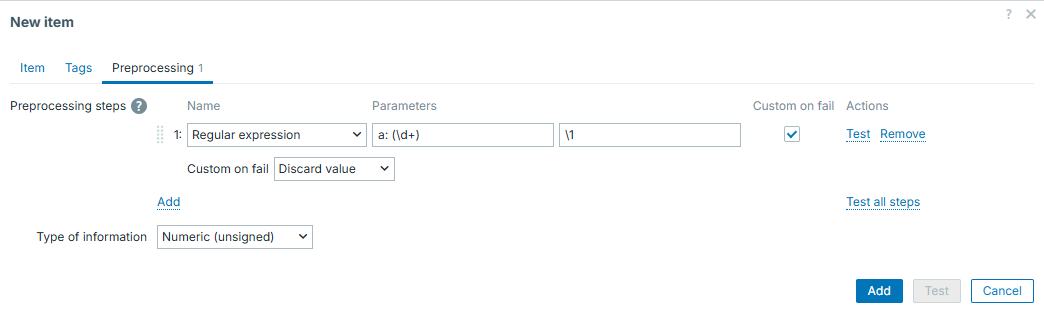
This dependent item will have the following preprocessing - it will extract number from line starting with "a":
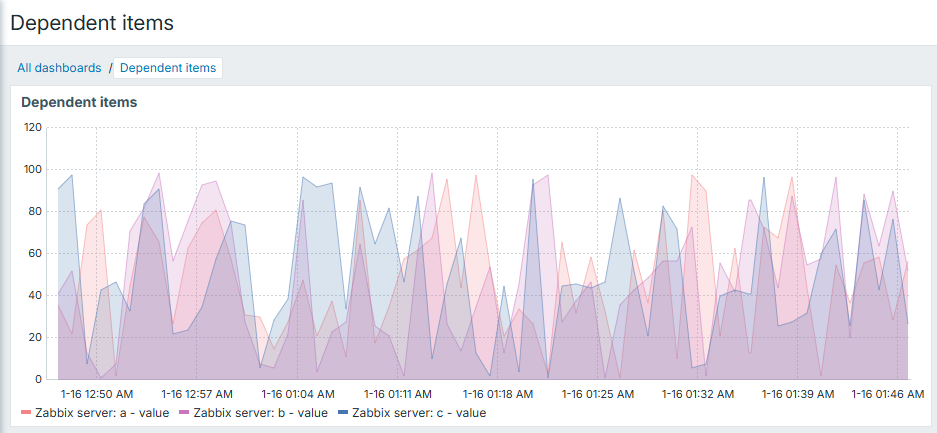
We will then clone the first item in same fashion and get a full set of items:

Now data is being collected once and we have 3 separate numeric items, which we can use depending on our needs - draw some graphs, have some triggers on top, etc.
Dependent items from json
Previous example had a "Regular expression" as the preprocessing step. In real
life, you might often face json as your master item, so preprocessing would be
different. Of course, regexp is a universal thing so it is also suitable to
extract something from json, but there is a dedicated preprocessing type
exactly for this purpose - JSONPath.
So first let's modify our example script to produce json:
#!/bin/bash

json="{"

for x in {a..c}; do
  json+="\"${x}\":\"$((RANDOM%100))\","
done

json="${json%,}"
json+="}"

echo "${json}" >/tmp/master.json

exit 0
Now we can have similar approach of one single master item and bunch of
dependent items nearby. Just this time, we would have JSONPath as
preprocessing step for dependent items.
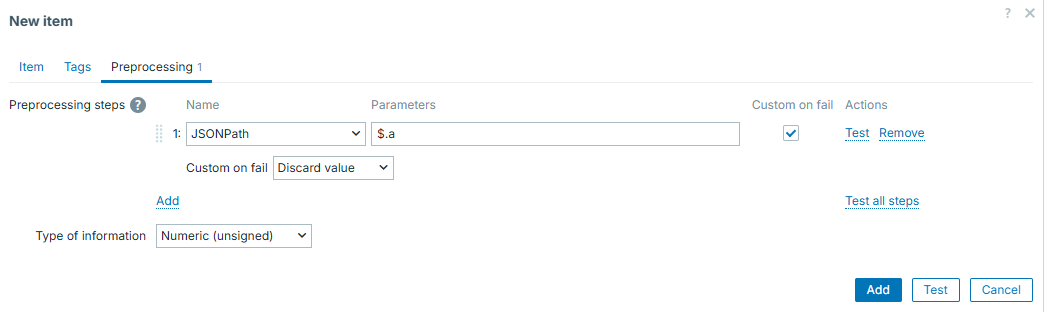
Easy and smooth!
Dependent items and LLD
Now imagine our example script produces not {a..c} but a full alphabet,
{a..z}. We could clone dependent items one by one, but that would also
include editing the preprocessing step regexp each time as well. If you are
familiar with LLD, you most likely see where this goes. We will apply LLD here
and combine it with dependent items!
For LLD, we will use log_discovery.sh, which makes it possible to perform LLD
from log files (thus, also, from any other text files). Source for this script
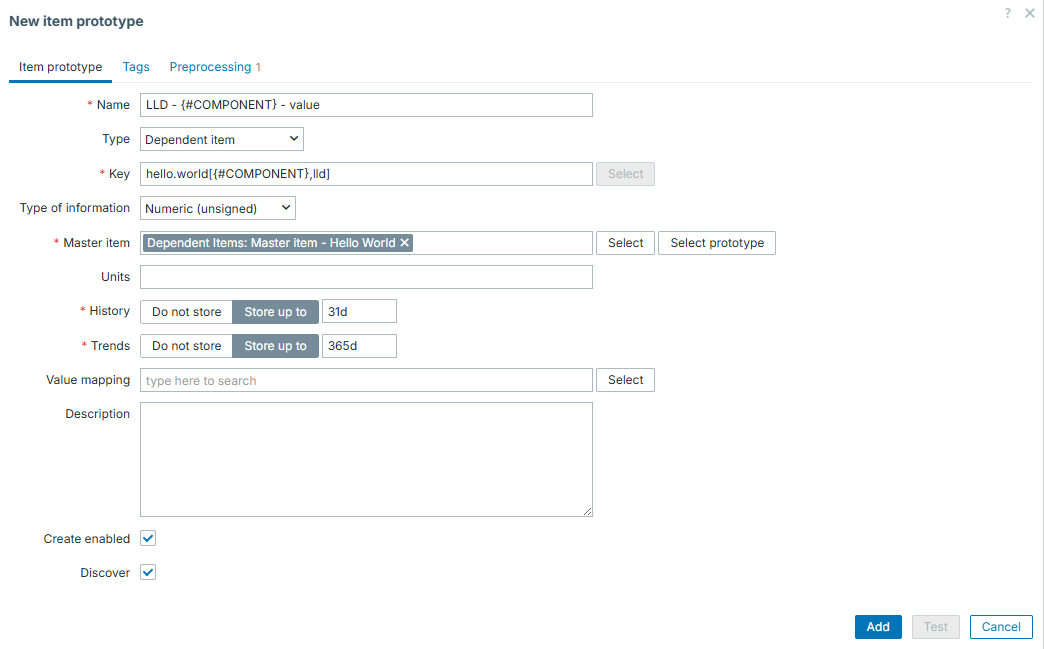
can be found in the "Useful URLs" section. It will have item prototypes of
"Dependent item" type and will rely on master item in same template, just
outside of discovery.
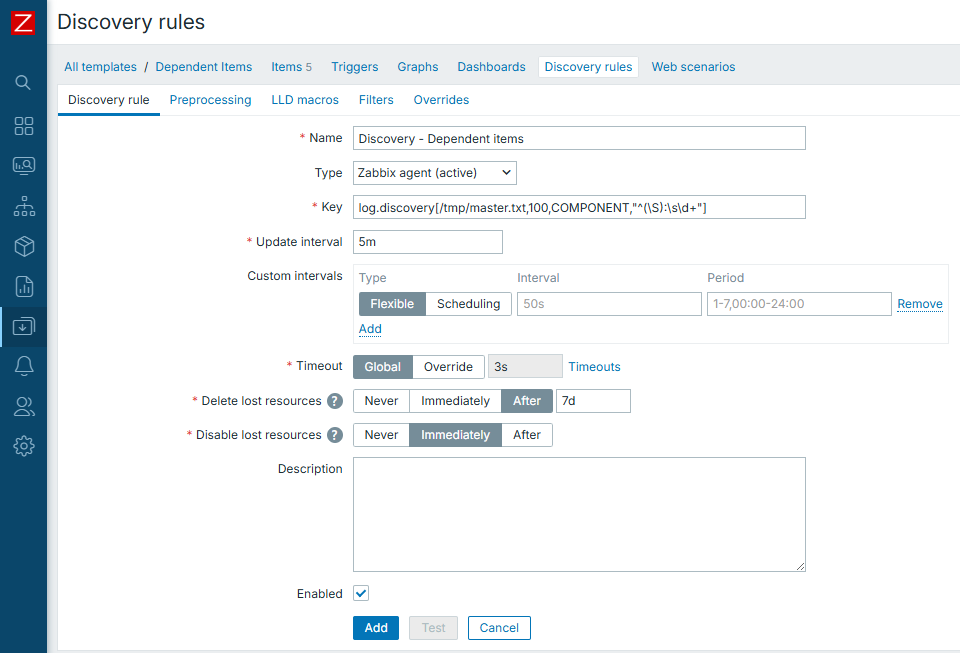
And then item prototypes would look like:
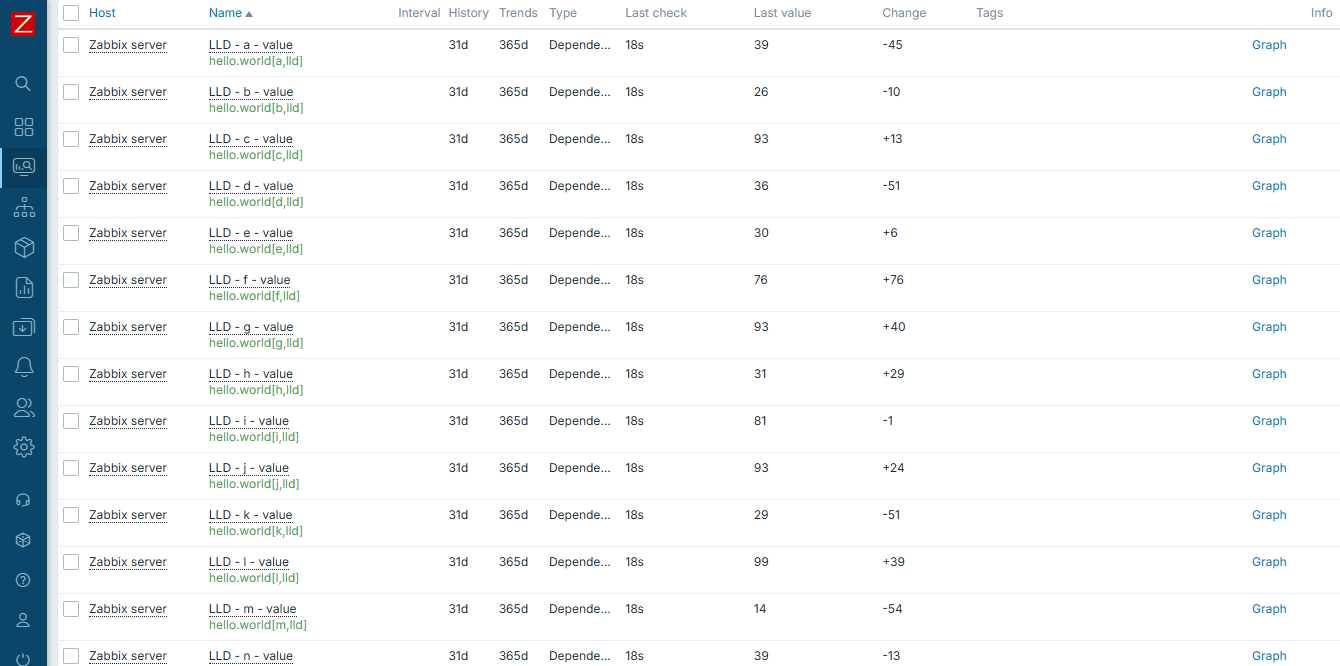
Once LLD "magic" happens, we have all items in place:
Now by using wildcard in our dashboard "Graph" widget:
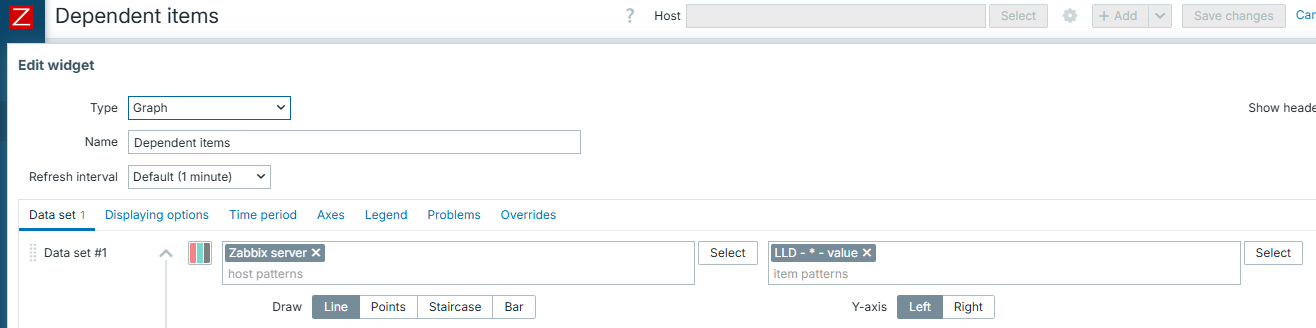
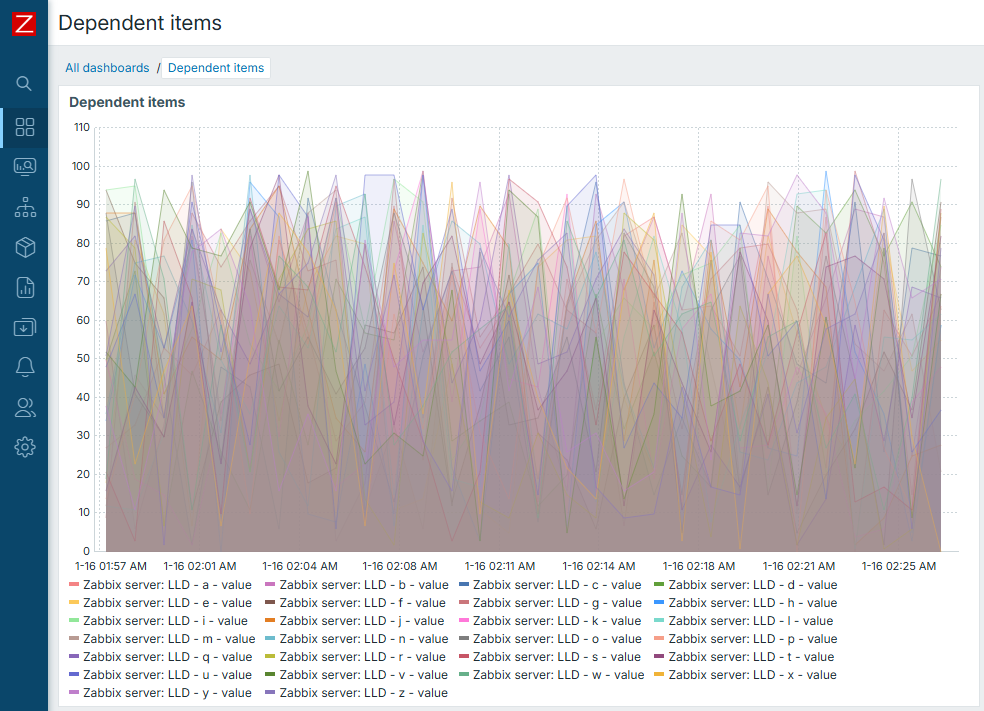
we are able to select all of our items at once. Thanks to LLD, we are able to create all of our items at once. Finally, thanks to the concept of "Dependent items", we are able to collect all of our data at once.
This is truly beautiful once you understand it.
Conclusion
Dependent items concept is a great way to become more efficient in data collection under certain circumstances.
If you have some huge structured data file or output and want to split it into separate monitoring entities - think no more. Dependent items are here for you. Same is applicable to all the other cases when you want to collect data once but have multiple separate metrics out of it.
Questions
- Does master item have to be some special type of item or it can be collected in any regular way?
- Are you limited in number of dependent items from one master item?
- What is the main benefit of using dependent items?