Zabbix architectuur
In dit hoofdstuk doorlopen we het installatieproces van de Zabbix server. Er zijn veel verschillende manieren om een Zabbix server op te zetten. We behandelen de meest voorkomende opstellingen met MariaDB en PostgreSQL op RHEL- en SLES-gebaseerde distro's en Ubuntu.
Voordat je begint met de installatie, is het belangrijk om de architectuur van Zabbix te begrijpen. De Zabbix server is modulair opgebouwd en bestaat uit drie hoofdcomponenten, die we in detail zullen bespreken.
- De Zabbix server
- De Zabbix webserver
- De Zabbix-database
Aanmaken van DB-gebruikers
In our setup we will create 2 DB users zabbix-web and zabbix-srv. The
zabbix-web user will be used for the frontend to connect to our zabbix database.
The zabbix-srv user will be used by our zabbix server to connect to the database.
This allows us to limit the permissions for every user to only what is strictly
needed.
1.1 Zabbix basissplit installatie
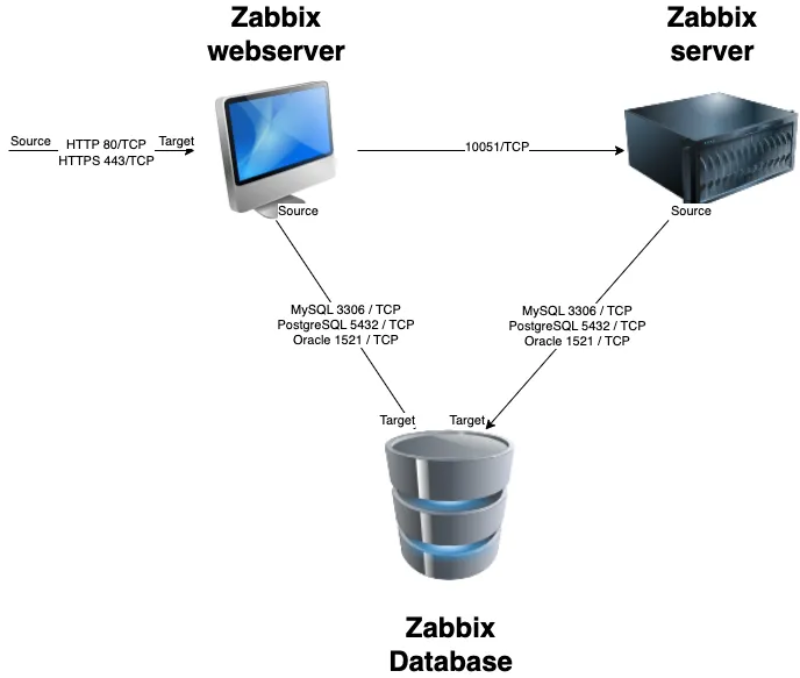
Al deze componenten kunnen geïnstalleerd worden op één server of verdeeld worden over drie afzonderlijke servers. De kern van het systeem is de Zabbix server, vaak het "brein" genoemd. Deze component is verantwoordelijk voor het verwerken van triggerberekeningen en het versturen van waarschuwingen. De database dient als opslag voor de configuratie van de Zabbix server en alle gegevens die het verzamelt. De webserver biedt de gebruikersinterface (front-end) voor interactie met het systeem. Het is belangrijk op te merken dat de Zabbix API deel uitmaakt van de front-end component, niet van de Zabbix server zelf.
Deze componenten moeten naadloos samenwerken, zoals geïllustreerd in het bovenstaande diagram. De Zabbix server moet configuraties lezen en monitoringgegevens opslaan in de database, terwijl de front-end toegang nodig heeft om configuratiegegevens te lezen en te schrijven. Bovendien moet het front-end de status van de Zabbix server kunnen controleren en extra benodigde informatie ophalen om een soepele werking te garanderen.
Voor onze opstelling gebruiken we twee virtuele machines (VM's): één VM host zowel de Zabbix server als de Zabbix web front-end, terwijl de tweede VM de Zabbix database host.
Note
It is perfectly possible to install all components on one single VM or every component on a separate VM. The reason why we split the DB in our example is because the database will probably be the first component giving you performance headaches. It is also the component that needs some extra attention when we split it from the other components, so for this reason we have chosen in this example to split the database from the rest of the setup.
We behandelen de volgende onderwerpen:
- Install our Database based on MariaDB.
- Install our Database based on PostgreSQL.
- Installing the Zabbix server.
- Install the frontend.